
How Accurate is a GPS Tracker? Causes of Errors and How to Improve It
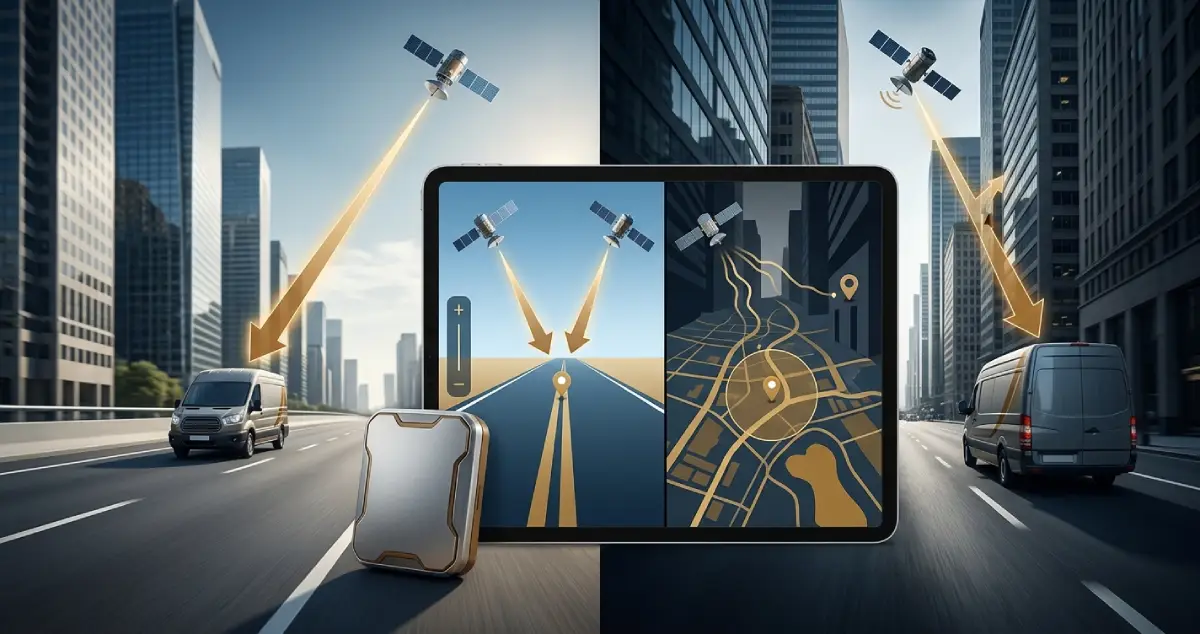
How accurate is a GPS tracker? Under ideal conditions, most GPS trackers can locate a vehicle within a few meters, but buildings, blocked satellite signals, and poor installation can reduce GPS tracker accuracy. Device quality and surroundings also play a big part. Learn what causes GPS errors and how to improve tracking accuracy for more reliable vehicle monitoring.

What is GPS Tracker Accuracy?
The GPS tracker receives signals from satellites orbiting the Earth. Each signal carries information about the time of emission; based on the travel time of at least four satellites, the tracker calculates its position.
Accuracy is the difference between the calculated values and the actual position of the tracker. In simpler terms, if your GPS tracker indicates that your truck is several meters from the actual location, this discrepancy is called positioning error. Different trackers, as well as one tracker at different times, may have different accuracy.
GPS Accuracy vs. Update Interval
Accuracy is different from the update interval. Even if the gps tracker is very accurate, it will only show you the last known location until the next fix.
How Satellite Visibility Affects GPS Tracker Accuracy
A GPS tracker typically achieves maximum accuracy when it has a clear view of the sky. This allows it to receive the maximum number of signals from satellites, which contributes to the accuracy of the position.
As a rule, a tracker needs at least four satellites to determine the position. The more the better, but the quality of signals, their angle of incidence, and the overall arrangement of satellites above the horizon are also important.
The tracker’s installation location can affect signal reception. Avoid placing it behind substantial metal obstructions, and follow the manufacturer’s recommendations for antenna positioning and installation.
Environmental Factors That Reduce GPS Accuracy
Often, the environment can affect GPS accuracy, even if the tracker has a good view of the sky.
1. Buildings and the Urban Canyon Effect
Skyscrapers in large cities often deflect satellite signals. These signals travel different paths to the tracker, bouncing off glass and concrete. This phenomenon is called multipath interference. In effect, the GPS tracker may think it is in a different place than it actually is. Such GPS inaccuracies are called urban canyon effects.
2. Tunnels, Garages, and Forests
Tunnels and underground garages are also examples of obstacles, as are thick woods on forest roads. Fortunately, such cases are relatively rare.
3. How Weather Affects GPS Accuracy
The impact of weather conditions is often overestimated. Heavy rain, clouds, and high winds have a mild effect on accuracy. A storm can be a problem for any electronics, but such events are also rare. The biggest effect on accuracy is the interference of GPS signals by buildings and other large objects.
4. GPS Signal Jamming
Finally, GPS trackers may suffer from deliberate interference. Jammers emit radio noise that drowns out satellite signals, preventing the tracker from determining its position. The reason for creating such interference can be anything from criminal intent to protest.
Device Quality and GPS Tracker Accuracy
Not all GPS trackers are created equal. Some devices may have better accuracy due to specific technologies.
1. GPS receiver Quality
Most importantly, the receiver in the tracker may differ. Some chips process signals and calculate the position better than others.
2. Multi-system Satellite Support
Some GPS trackers support multiple satellite systems simultaneously, not just the American GPS. The simultaneous use of GPS, GLONASS, Galileo, and Beidou may improve accuracy.
3. Antenna Design
The quality of the antenna also affects accuracy. Sometimes the manufacturer sacrifices it for a lower price.
4. Motion Sensor
Some GPS trackers have a motion sensor that helps determine when the vehicle is moving. The use of such sensors varies from manufacturer to manufacturer.
Update Interval
The update interval determines how frequently the tracker records or sends location data. Shorter intervals provide more frequent updates, which can be useful for city driving and live fleet monitoring. Longer intervals may be sufficient for vehicles traveling on predictable highway routes.
How Installation Location Affects GPS Accuracy
Even the best GPS tracker can perform poorly if it is improperly installed. The installation location can affect signal reception, so avoid placing the tracker behind substantial metal obstructions and follow the manufacturer’s recommendations for antenna positioning and installation.
- Using metal partitions inside the car or van, or a heavy metal plate behind which the tracker is located, can significantly weaken the signal.
- Metallic-coated windshields and metallic sun visors can also block GPS signals.
- Wired GPS trackers require a stable power supply. Otherwise, the tracker may lose power, which will ultimately affect the accuracy.
- Finally, always remember that the installation site directly affects the accuracy. Study the manufacturer’s instructions carefully and, if possible, contact a professional installer.
Does Mobile Network Coverage Affect GPS Tracker Accuracy?
There is a common misunderstanding that GPS trackers require mobile network coverage to work. In fact, the tracker does not need it to calculate its position, since it gets that information from satellites. However, you may notice that your GPS accuracy is lower when the tracker is in an area with poor coverage.
Mobile network coverage affects several aspects of a GPS tracker.
1. Transmitting data
The tracker needs a mobile connection to transmit information to your account. Some GPS trackers store data and then transmit them in batches when the connection is available. In areas with poor coverage, the app may not show the last known location of the tracker until the connection is restored.
2. Faster positioning with assisted GPS
Many modern GPS trackers use assisted GPS. This technology allows the device to determine the position faster by obtaining satellite data through a mobile network.
3. Positioning without GPS (cell tower)
In case of GPS signal failure, the tracker may use cell tower positioning. This method is much less accurate, sometimes by hundreds of meters, so it is best to treat it as a rough estimate.
8 Tips to Improve GPS Tracker Accuracy
You do not have to be an expert to get great accuracy. Here are some simple tips that may help.
1. Choose a Multi-system GPS Tracker
Look for a GPS tracker that supports various satellite navigation systems. This will allow the tracker to receive more signals and, therefore, determine the location more accurately.
2. Choose the Installation Location Carefully
Avoid placing the tracker behind substantial metal obstructions, and follow the manufacturer’s recommendations for antenna positioning and installation.
3. Avoid Tinted Windshields
Prevent interference from special films on the windshield.
4. Use a Stable Power Supply
Make sure the tracker is powered on and connected to a stable power supply.
5. Set the Right Update Interval
Set the update interval based on the type of traffic. City driving and live monitoring benefit from shorter intervals, such as every 10 seconds, while long-haul highway routes can often use intervals of up to 5 minutes. Keep in mind that this changes how often you receive updates, not how accurate each position is.
6. Give the Tracker Time to Get a Fix
After turning on the tracker, do not immediately use it. Let the device determine the location several times.
7. Pick a Tracker With Internal Memory
If your drivers often drive through remote areas with no network coverage, choose a tracker with internal memory to store data.
8. Review Your Location Data Regularly
Inconsistent data may indicate poor accuracy. If your truck is in one place, but the tracker indicates that it is in another, check if there are problems with the device.
Why GPS Tracker Accuracy Matters for Fleet Management
For business owners who use commercial vehicles, this article has a more important purpose: learning how GPS accuracy works and why it is essential for effective fleet management.
1. Live Tracking and Route Optimization
Accurate positioning allows you to track your vehicle’s location in real time with high precision. This is vital when verifying the correctness of the route performed by the driver and the time spent at each stop.
2. Geofencing Accuracy
To protect the vehicles and monitor their location, many companies use geofencing technology: virtual fences visualized on the map so that the tracker notifies when the vehicle approaches or crosses the designated boundaries. Inaccurate GPS means inaccurate geofencing, which results in many false alarms.
3. Driver Safety
Knowing the vehicle’s location and movement dynamics helps monitor driver behavior and safety. Speed, acceleration, and stops allow you to track whether the driver is obeying the rules of the road.
4. Theft Recovery
If the vehicle is stolen, accurate GPS information will help recover the vehicle. In this case, the tracker’s accuracy is critical because the owner or dispatcher has to track every move of the vehicle in real-time. However, you should also know that not all GPS trackers can recover stolen vehicles.
5. Efficient Fuel Use and Maintenance
Using the vehicle’s positioning data, you can analyze how many kilometers it travels on average and plan fuel and other expenses. In addition, you can track the health of the vehicle based on the data provided.
6. Customer Notifications
By knowing the current location of the vehicle and its planned route, you can provide customers with accurate information about the status of their order and expected time of arrival.
Conclusion: Choosing an Accurate GPS Tracker
GPS tracker accuracy depends on the device quality, signal reception, surrounding obstacles, and connection stability. Understanding these factors can help you choose the right tracker for your fleet. Contact the MuxTech team for a recommendation that suits your fleet, routes, and reporting needs.